TaerraDownload

Paper + Fabric

Your world, live in 3D

One map, rendered on your server: in the browser, and in game.

TAERRA turns your Minecraft worlds into a live map anyone can open: block by block, with sunlight and shadows, seen from above or at an angle from all four sides. Players get the same map in game, with everything the browser has and a minimap on top.

Free for every server, commercial ones included.

A whole Minecraft world rendered by TAERRA as one isometric block of terrain
Looking northwest

Showreel

See it move

Plays from YouTube, which sets its own cookies once started.

Speed

A whole world in minutes

Everything is rendered on your server, on its own threads. Visitors only download finished images, so the map is as fast on a phone as on a gaming PC.

2:21min
for a 6,000-block-radius world, about 440,000 chunks, in every view at once.
~2ms
per tick on the main thread for live updates. Full renders take nothing from it.
50%
of your CPU cores render by default, always leaving at least two to the game.

Measured on an Intel Core Ultra 7 265 with 64 GB of RAM.

The map

A map worth looking at

Switch between isometric and top-down any time. The isometric view turns in four directions, so nothing hides behind a mountain.

A close-up of the isometric map: forest, a river, cherry trees and hills, every block a shaded cube

Every block, one cube

Lit, shaded and biome-tinted, from the whole world at a glance down to a single block. A warm sun and a cool sky turn shadows blue-violet instead of muddy gray, and water is something you see into: reefs glow turquoise, trenches fade to navy, a sunken build shows through.

The same world from straight above, as a flat map

A classic flat map, one click away

Prefer it flat? The top-down view is right there. Switch the map to gray when the markers on it matter more than the terrain.

The whole Nether as one isometric blockThe End’s islands as one isometric block

Overworld, Nether, End

Every dimension, and every custom world, gets a map of its own.

Live

Always the world as it is now

  • Players move live

    Positions update every second, with a player list and a follow mode that keeps someone in view, even across worlds.

  • Colors from the Locator Bar

    Every player wears the color of their dot on the Locator Bar, so you know who is who at a glance, on the map and in game.

  • The map keeps up

    Every change is recorded, built by players or grown by nature, and redrawn on an interval you choose. A spot changed a hundred times is drawn once.

  • Watch it render

    A render shows its progress right on the map, with the time it has left, in the browser and in game. Staff start a full render, or cancel one, with a right-click.

  • Discover the world

    Discoverable regions stay under fog until you walk into them, then clear for you alone, with a sound and a burst of sparks on the web map, a toast in the mod or a line in chat.

  • Regions on the map

    Every region shows as an outline in its own color, and gets its name and fill once you have found it, so you always see what is left to explore.

For servers

Made to run on yours

  • Logins without passwords

    Type the short code the map shows after /taerra login, and the browser logs itself in for 30 days or as long as the server sets, then hands the login to your phone as a QR code. Codes work once, and players see every login in game.

  • Waypoints, areas and lines

    In named groups and colors, private ones too, each with an optional description and an icon: built in, uploaded or drawn by your staff or added by plugins. Players with permission draw, move and recolor them on the map: areas chunk by chunk or point by point, lines straight or smooth.

  • Waypoints of your own

    Every logged-in player keeps up to 100 waypoints, areas and lines only they see, in the browser and in game, and a Last Death waypoint marks where they died. Other plugins can show players their own markers too, like their homes.

  • Privacy built in

    Spectators are listed without their world and position, vanished and invisible players stay off the map, and players who hide from server lists show as an anonymous dot. Player heads come from your server, so viewing the map never reveals a visitor to Mojang.

  • Private worlds and layers

    Hide a world or a layer from everyone except logged-in players with the right permission, or only where the players in a world are, and choose who may teleport, draw markers or render from the map. Staff can also see the loaded chunks, colored by load level.

  • Right-click anywhere

    Copy coordinates, or a link that opens the map right there. Logged-in players with permission teleport to the spot in one click.

  • One jar, set up live

    No database required, no CDN, no web server to set up. Staff change worlds, their order, names and limits, private layers, the server name and the renderer on a settings page in the browser or in game, together and without a restart, or with /taerra config.

  • Search everything

    Press / to find players, markers, worlds and coordinates across every world. The mod has the same search on a key of its own.

  • Show only what is ready

    Limit the map to a circle, square or rectangle, so it ends where your playable area does, and draw named regions chunk by chunk. Cover one in fog while staff build there, or in a thin veil that only hints at what lies beneath, and let every player clear the fog for themselves by walking in.

  • Installs like an app

    On phones and desktops, as soon as the map is served over HTTPS.

  • English and German

    The web map, the mod and every message in game speak both.

  • Export as images

    One command turns the map into images, ready for a wiki page or a poster.

Plays well with others

Fits the plugins you already have

  • WorldGuard

    Regions as a layer, private to staff unless you share it.

  • Towny

    Towns as a layer, each with its mayor, nation and residents.

  • GriefPrevention

    Claims as a layer, private to staff unless you share it.

  • PlotSquared

    Claimed plots as a layer, each with its owners and members.

  • World borders

    The vanilla world border and ChunkyBorder's borders as a layer.

  • Chunky

    Stays out of the way while Chunky generates, then says when a full render is worth it.

  • dynmap

    Bring your markers over as waypoints with one command, their icons as the closest built-in ones.

Fabric mod

The same map, in game

The optional Fabric mod brings your server’s map to your players. Join a server running TAERRA and it connects by itself, already logged in, so no /taerra login is needed in game.

Get the mod

Needs Fabric API and a server running the plugin. Mod Menu is optional.

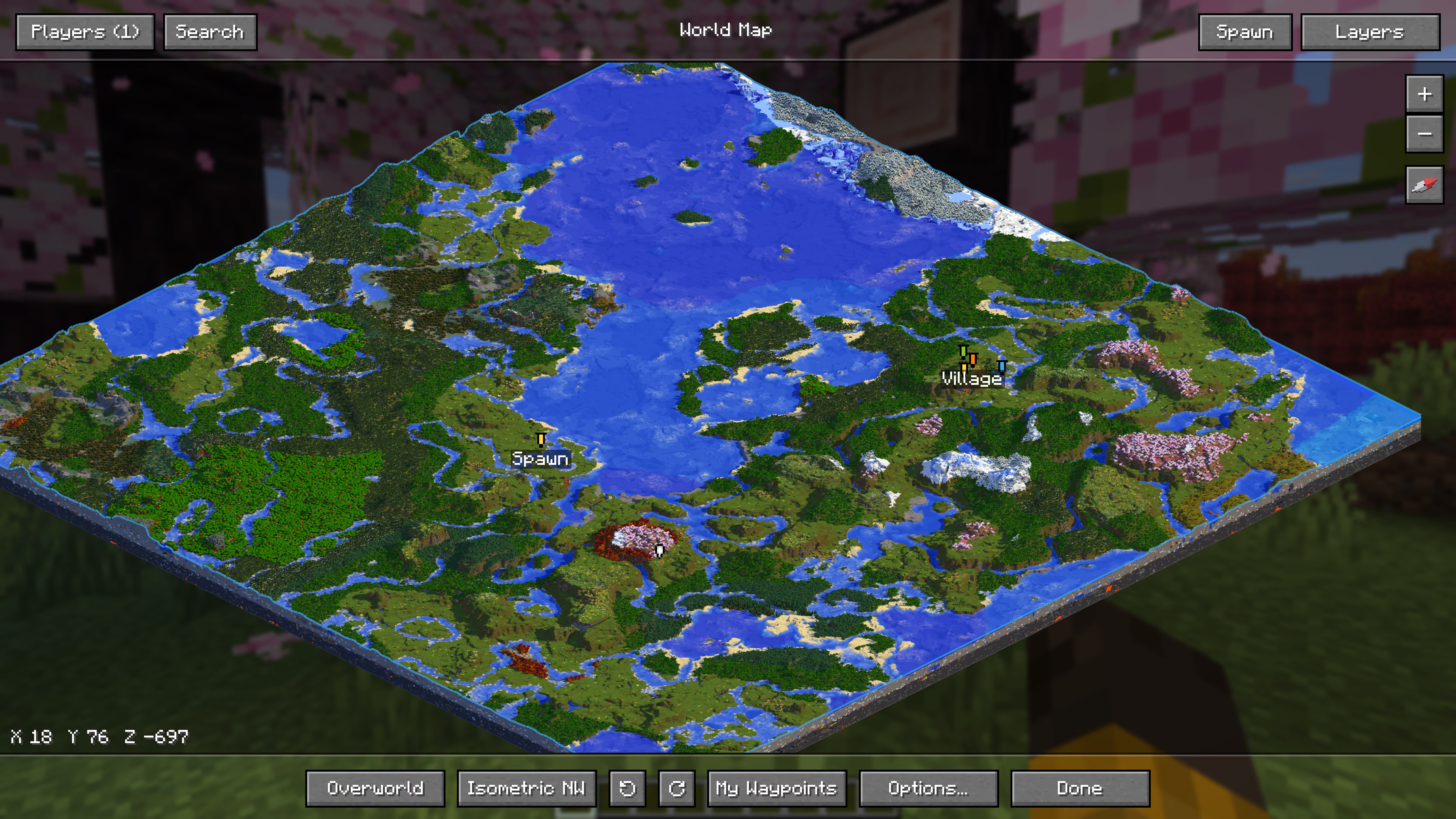
The mod’s world map in the isometric view, the whole world as one tilted block over the game, with waypoints at spawn and a village

The whole map on M

Press M for the full world map, with everything the web map has: both views and all four rotations, color or gray, layers, the player list and follow mode. K searches players, markers, worlds and coordinates. Right-click any spot to navigate there, set a waypoint, or copy its coordinates or a link to it.

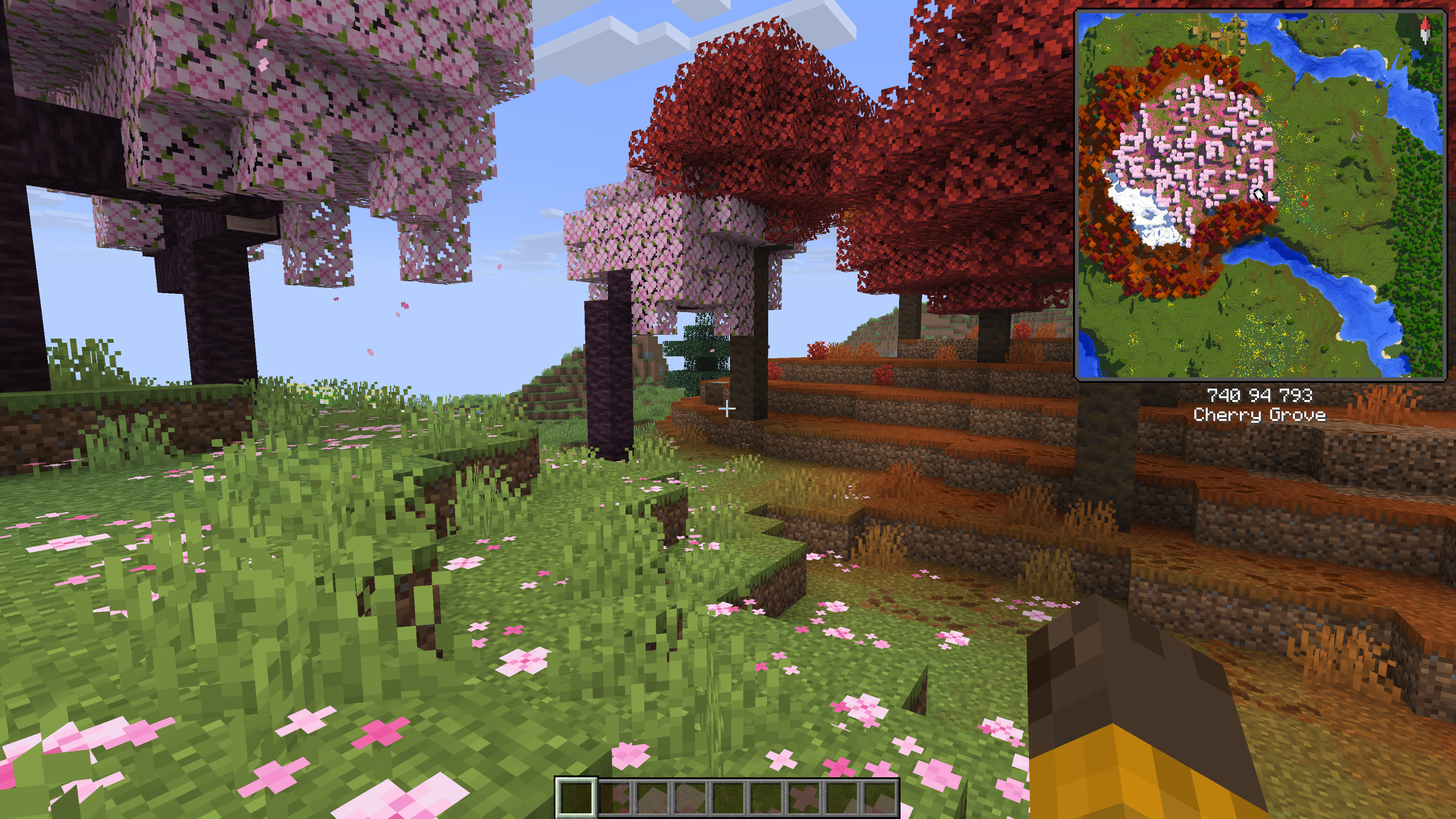
A cherry grove in game, with the minimap in the top right corner and the coordinates and biome below it

A minimap, your way

Size it, zoom it with = and -, put it on either side and let it turn with you. Below it, pick the lines you need: coordinates and their Nether counterparts, chunk, facing, biome, weather, time and day, light level, real time and FPS. Markers past its edge stay in view, so nothing nearby gets lost.

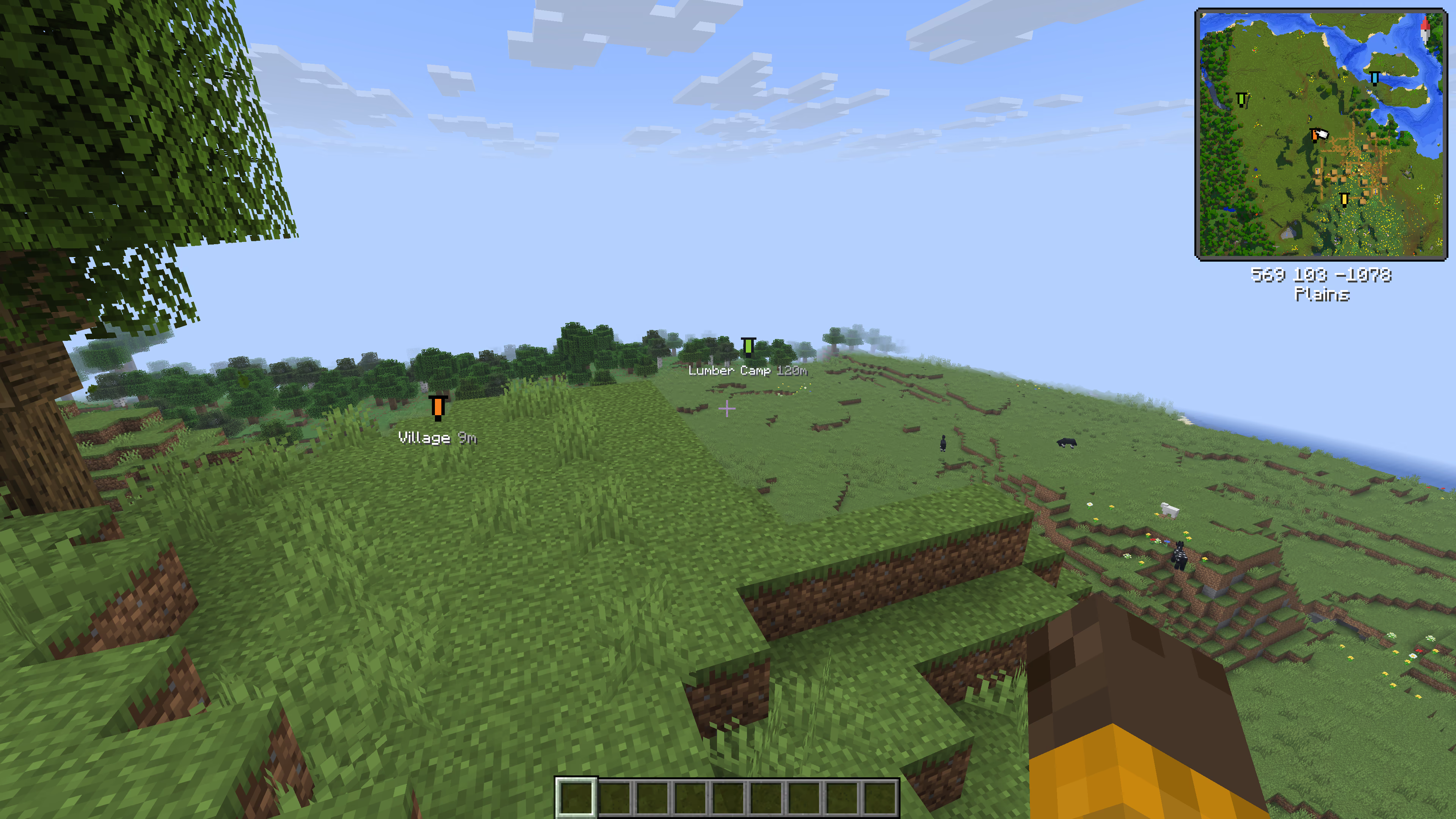
Plains seen from a hill, with the labels Village and Lumber Camp and their distances floating over the places they mark and the minimap in the corner

Waypoints where they are

Waypoints float as labels over the places they mark, with the distance to each, so you find your way without opening a map. B hides them when you want a clear view.

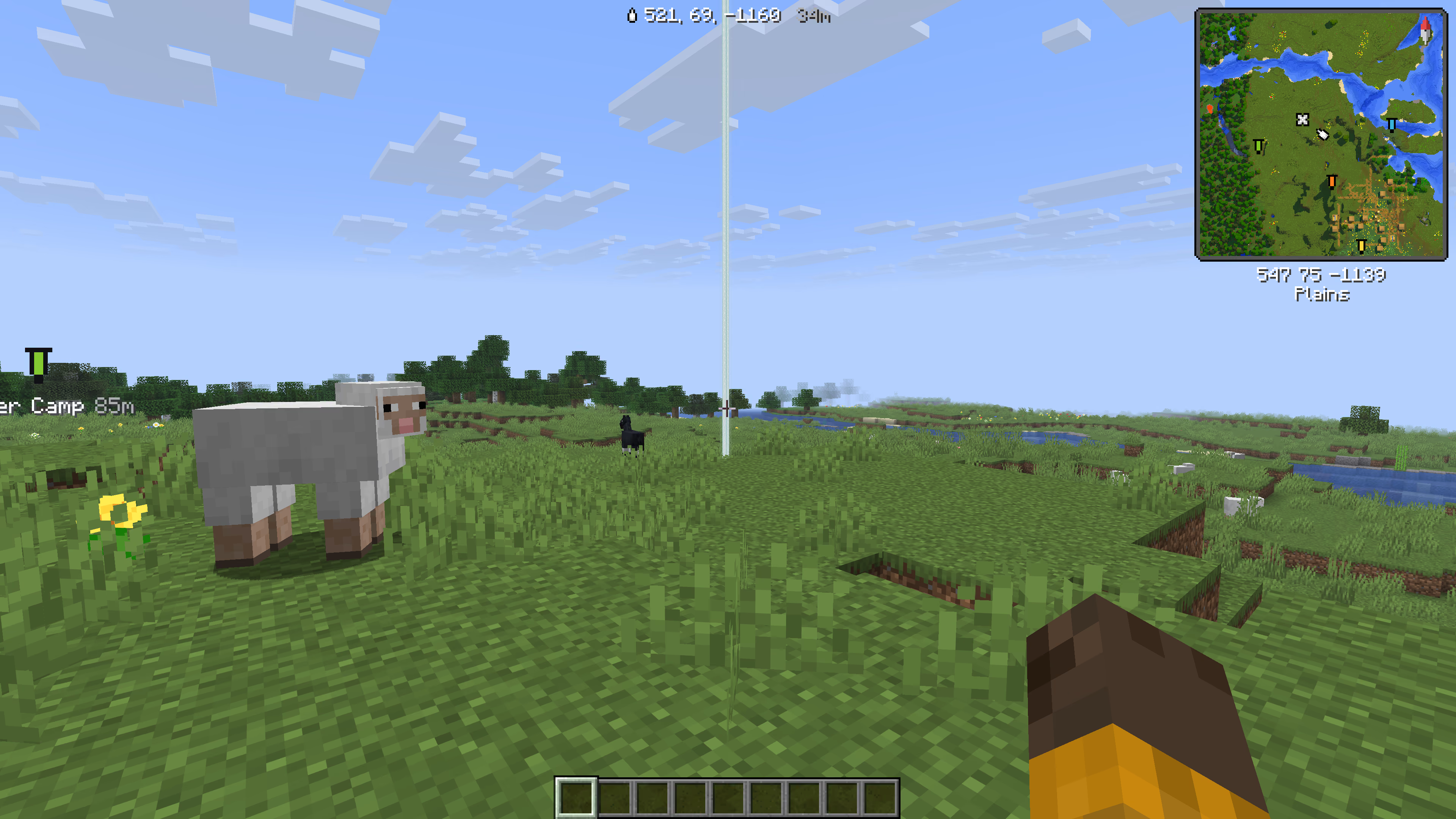
Navigating in game: a beacon beam rises at the target, and the arrow at the top of the screen shows its coordinates and the distance

Find your way there

Navigate to a waypoint, a player or any spot, started on the map in game or from the web map while you play. A beacon beam rises at the target, and an arrow at the top of the screen shows the way and the distance, through a portal when it is in another dimension.

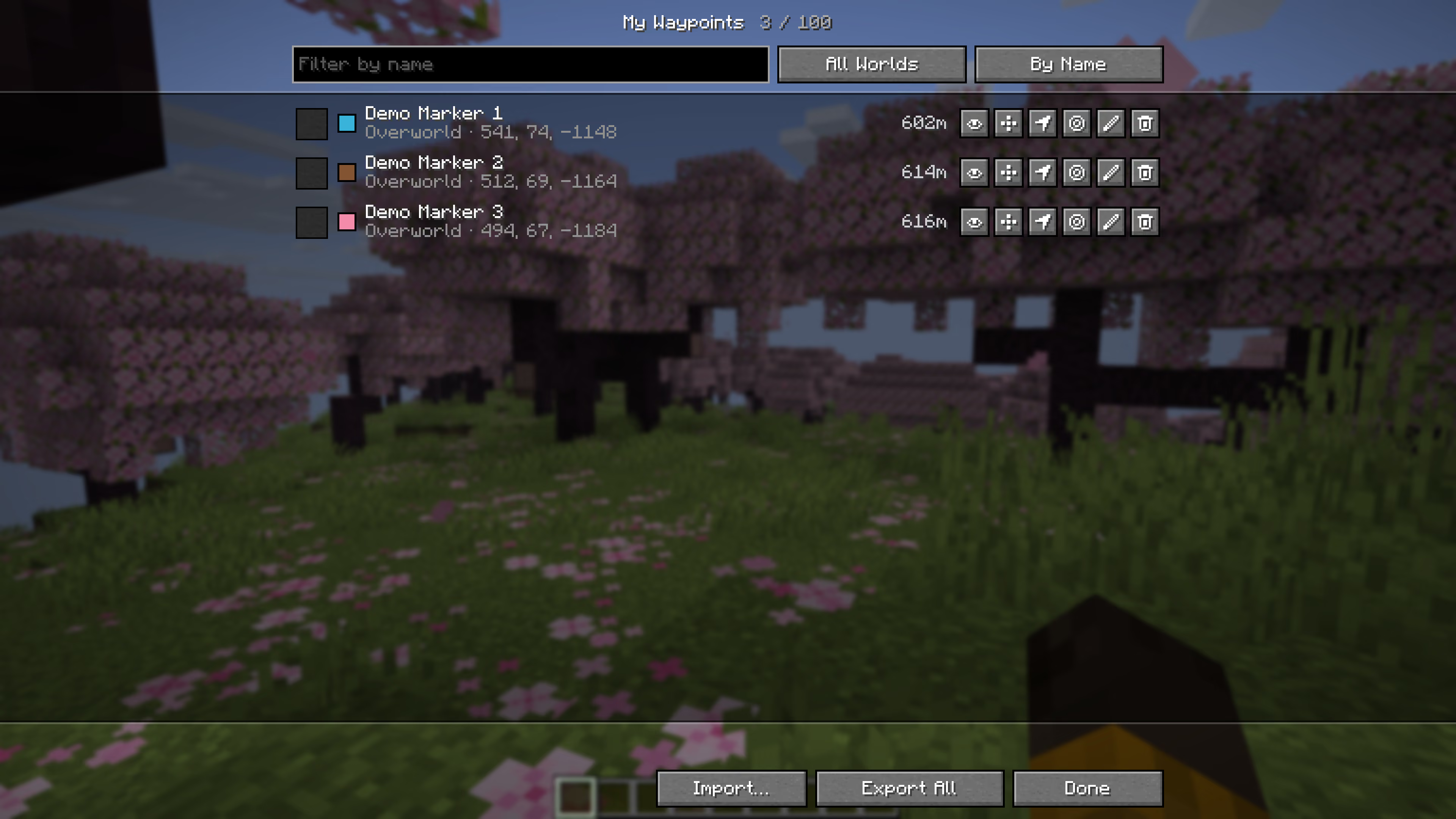
The My Waypoints list with three waypoints, each with its world, coordinates and distance and buttons to show, move, navigate to, center, edit and delete it

Your waypoints, one key away

H sets one where you stand, and on the map you draw areas and lines too. J opens your list: filter it, sort it by name or distance, hide single ones, and export them as a file to share or keep, or import one. When you die, a Last Death waypoint marks the spot.

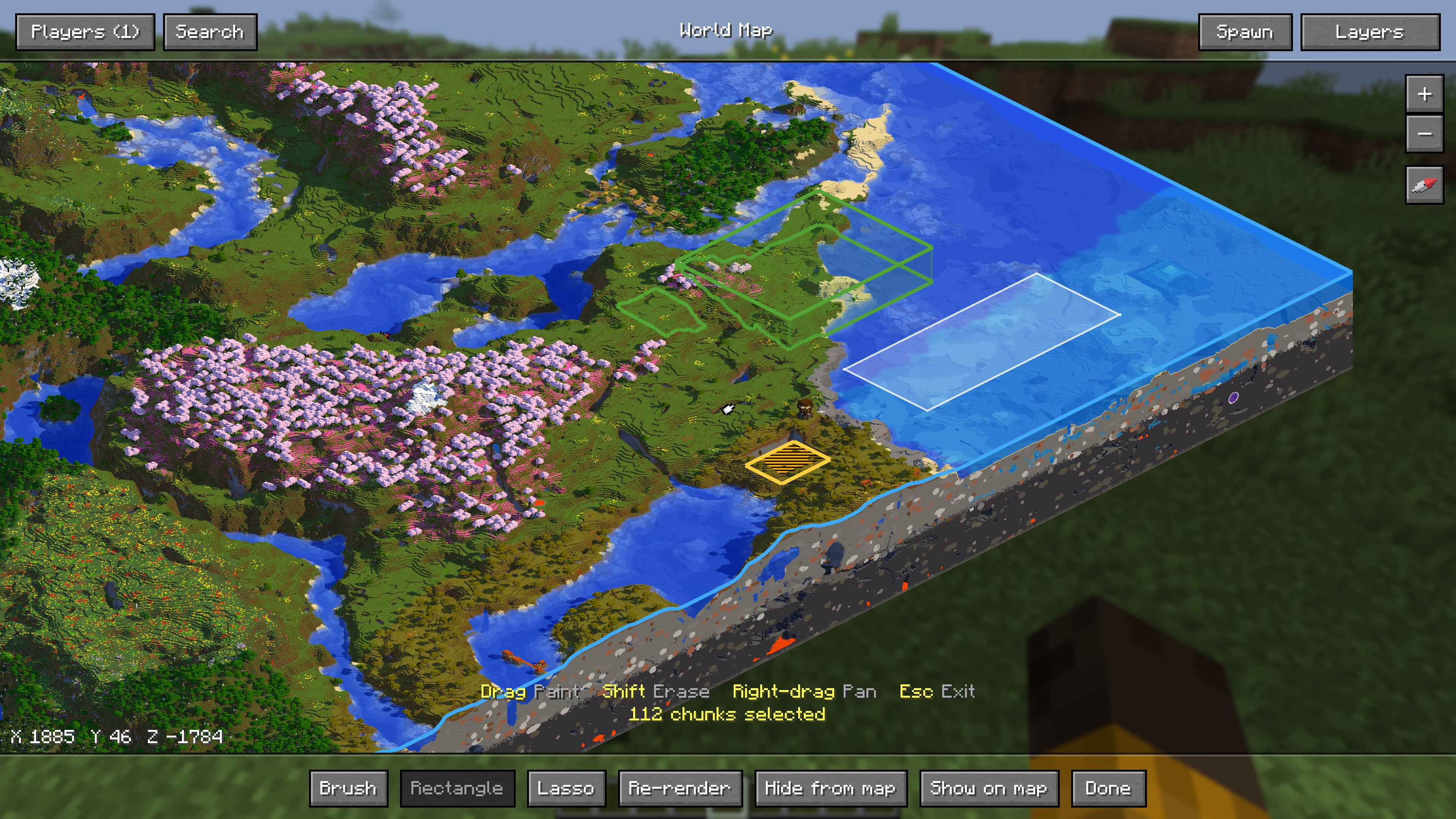
A close isometric view of a coast with WorldGuard regions outlined in green, a hidden area in caution stripes and 112 chunks selected for rendering again

Layers and staff tools

WorldGuard regions and world borders are layers you switch on. With permission, select chunks to render them again, draw regions and fog them, and watch a render’s progress right on the map. Staff change the server’s settings on a screen of their own.

And also

  • Teleport from the map

    Right-click to go anywhere, where the server lets you.

  • Your devices

    See every browser logged in as you, and log any of them out, from the settings.

  • Every key yours

    Change any key in Minecraft’s controls. The settings open from the world map or Mod Menu.

  • Always in step

    When the mod and the server’s plugin don’t match, it tells you which one to update.

  • Light on your game

    It renders nothing itself: it draws the images the server already made.

  • English and German

    Every screen and message speaks both.

Getting started

Six steps to a live map

  1. Install

    Put the plugin jar in plugins/ and start the server. It downloads its libraries on the first start, so the server needs internet access once.

  2. Choose your worlds

    None are on the map until you enable them.

    /taerra config world minecraft:overworld enable
  3. Render

    Draw the whole world once. From then on, changes are drawn by themselves.

    /taerra render full minecraft:overworld
  4. Open the map

    The plugin serves it itself, no web server needed.

    http://<your-server>:8100
  5. Make it public

    Put the map behind a reverse proxy with HTTPS, on its own domain or under a path like /map/, and tell TAERRA its address. Login links and link previews use it.

    /taerra config web.public-url https://map.example.com
  6. Name it

    Your server’s name in the map’s header, page title and link previews.

    /taerra config web.name "My Server"
Plugin
Paper 26.3 and Java 25. Spigot and Folia are not supported.
Mod
Fabric Loader, Fabric API and Minecraft 26.3, on a server running the plugin
Updates
Update the plugin first. A mod newer than the plugin asks players to have the server updated. Plugin and mod share one build counter, so their numbers skip and don’t have to match.

Every setting can be changed in game with /taerra config, or on the settings page of the map. Every build and what changed in it is on the download page.

Reference

Commands and permissions

Everything runs through /taerra. The permissions work with LuckPerms or any other permissions plugin, and every private world, layer and world’s players get one of their own. With LuckPerms, changes reach the map right away, even for players who are offline.

Commands
CommandWhat it does
/taerra statusWhat the renderer is doing, with details on hover
/taerra render full <world>Render a whole world
/taerra render radius <world> <radius> [x z]Render an area around you, around spawn or around a point
/taerra render image <world> [zoom]Export the map as images
/taerra render cancelStop a running render
/taerra render flushDrop every queued tile, unrendered changes included
/taerra limit <world> circle|square|rectangle …Set how much of a world the map shows
/taerra config …Change settings, enable, name, order and hide worlds, make layers private or give them an icon
/taerra waypoint add|remove …Add or remove waypoints
/taerra import dynmap <file>Import markers from dynmap
/taerra login [code]Log in to the web map
/taerra logout [player]Log out of the web map in every browser
/taerra devicesSee and log out your web map devices
/taerra modSee who plays with the TAERRA mod, and which build
/taerra debugCopy the versions and setup a bug report needs
Permissions
PermissionDefaultAllows
taerra.loginDefault: everyone/taerra login, /taerra logout and /taerra devices, and being logged in by the mod
taerra.logout.othersDefault: opLogging other players out with /taerra logout <player>
taerra.statusDefault: op/taerra status
taerra.modsDefault: op/taerra mod
taerra.debugDefault: op/taerra debug
taerra.teleportDefault: opTeleporting from the map and the waypoint list
taerra.render.worldDefault: opRendering a whole world again, with /taerra render full or from the map
taerra.render.areaDefault: opRendering an area again, with /taerra render radius or by selecting chunks on the map
taerra.render.cancelDefault: opCanceling the running render, with /taerra render cancel or from the map
taerra.render.flushDefault: op/taerra render flush
taerra.render.imageDefault: op/taerra render image
taerra.limitDefault: op/taerra limit
taerra.configDefault: op/taerra config and the settings on the map and in the mod
taerra.importDefault: op/taerra import
taerra.waypoint.editDefault: opAdding, editing, moving and removing the server’s waypoints, with /taerra waypoint or on the map
taerra.waypoint.private-groupsDefault: opCreating private waypoint groups
taerra.waypoint.personalDefault: everyoneKeeping waypoints only you see
taerra.waypoint.deathDefault: everyoneGetting a personal waypoint where you last died
taerra.icon.editDefault: opUploading, renaming, replacing and deleting the server’s map icons
taerra.region.editDefault: opDrawing, naming, fogging and removing regions
taerra.region.resetDefault: opResetting who discovered a region, with taerra.region.edit
taerra.see.hidden-playersDefault: opSeeing hidden and anonymous players on the map
taerra.see.fogDefault: opSeeing through every region’s fog, and the players in it
taerra.world.<world>Default: opSeeing a private world, such as taerra.world.minecraft.the_end
taerra.players.<world>Default: opSeeing where players are in a world with private players, such as taerra.players.minecraft.overworld
taerra.layer.<layer>Default: opSeeing a private layer, such as taerra.layer.worldguard
taerra.hideDefault: nobodyBeing hidden from the map

Early access

Try it out, break it, report it

TAERRA already runs on live servers, and it is still growing: things can change between versions, and you may find rough edges. If something breaks or looks wrong, or you have an idea, report it on GitHub. Every report makes it better for everyone, and questions are welcome on Discord.

Free to use on any server, commercial ones included. Source available on GitHub.

Curious how it works under the hood? Read the technical deep dive.